Postmortem of my #30DayMapChallenge 2025
Behind the scenes of making the maps, ver. 2025
By Kenneth Wong in Behind the Scene Cartography
October 31, 2026
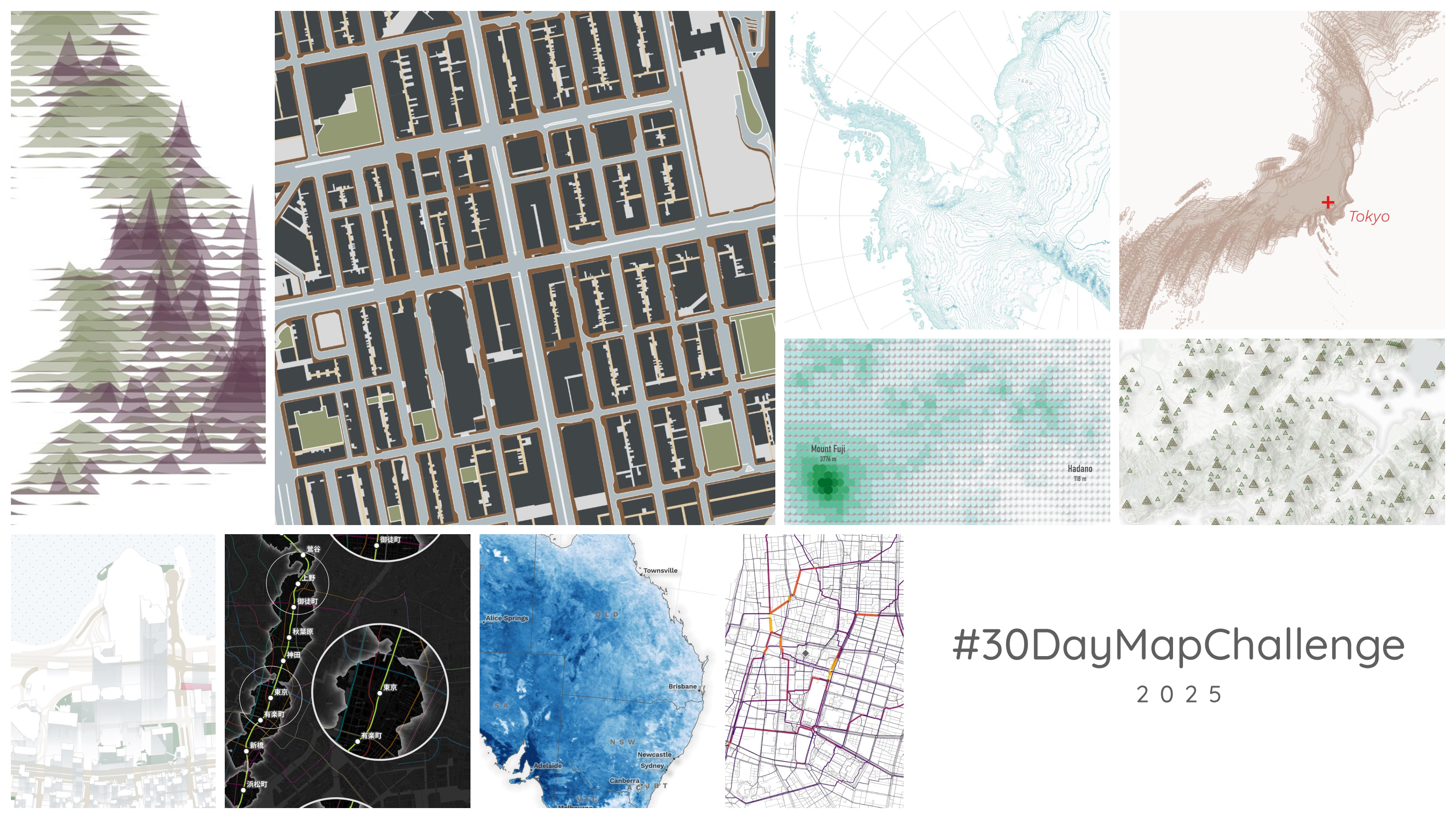
Does anyone mention #30DayMapChallenge in the early summer? Of course no. I am probably the only one, and it is of course because I am too lazy to write a new blog post even after the challenge ended for nearly one year ago.
I wrote the paragraph above sometime in May or June this year. Procrastination is such a wonderful gift from God. When the 2026 challenge trailer came out earlier this month, I knew it was time to sit down and finish this post. Maybe it can serve as some pre-challenge reading for anyone thinking of joining this year.
This was my fifth year joining the challenge. I still use #30DayMapChallenge as a chance to practise map making, especially now that I have fewer opportunities to make maps for academic research. Opening QGIS to craft a map feels more like a hobby than part of my daily work. I still use GIS from time to time, mostly to retrieve and inspect spatial data. Making maps is no longer a daily task.
Using my own words from 2024 (which, in turn, came from 2021):
Every challenge or competition should end with a postmortem to remind myself of what I did well and what I could improve. This post reflects on the behind-the-scenes processes, the good and the bad, and the reflections or footnotes of the maps I produced.
Postmortems from previous years:
The Maps
I posted maps for 12 themes. Several were late entries, partly because I was on holiday in Australia in late November, and mostly because I am lazy.
I’ve come to see the challenge as a reason to find ideas and turn them into maps. The “30-day” part of the title no longer applies to me.
| Day | Theme | Topic | Area |
|---|---|---|---|
| 1 | Point | Elevation of populated places | Kanto, Japan |
| 2 | Line | #popelevation #joyplot | United Kingdom |
| 3 | Polygons | Land use distribution | Hong Kong |
| 6 | Dimensions | Axonometric site plans | Hong Kong |
| 7 | Accessibility | 10-minute walking catchment of Yamanote Line stations (combined with Day 13) | Tokyo |
| 8 | Urban | Betweenness centrality of pedestrian network | Taiwan |
| 11 | Minimal Map | Contour map | Antarctica |
| 13 | 10 minute map | 10-minute walking catchment of Yamanote Line stations (combined with Day 7) | Tokyo |
| 14 | OpenStreetMap | Peaks | Hong Kong |
| 17 | A new tool | mapgl | Tokyo |
| 19 | Projections | Projected coordinate systems of Japan | Japan |
| 29 | Raster | Daytime/nighttime temperature difference | Australia |
Day 1 - Point
I do take the easy route sometimes. The Points theme is so broad, but elevation was all that came to mind. I had already used elevation and bathymetry for earlier entries, including 2021, and mapped temperature for 2022.
The process was familiar: resample the raster to a suitable resolution, convert it to points, and adjust the symbology. But I kept asking myself, “is there really nothing to add?” So I added some populated places and their elevations. At least I learnt how high Kofu and Yamanashi Prefecture are compared with Tokyo.
I’m not quite satisfied with this entry, but I didn’t want to spend too much time on it.
Tools used: QGIS
#30DayMapChallenge Day 1 - Points
— Kenneth Wong (@Kenneth_KHW) October 31, 2025
Elevation of populated places in the Greater Tokyo Area pic.twitter.com/iLQUiBH6Rf
https://x.com/Kenneth_KHW/status/1984298307871473909
Day 2 - Line
#Popelevation (population + elevation) has become a go-to entry for me. I’ve mentioned in previous postmortems how well these maps tend to do in views and impressions.
People can recognise the country and relate to its population distribution without much explanation. And who doesn’t love the simplicity of a joyplot?
Tools used: R
#30DayMapChallenge Day 2 - Lines#popelevation #joyplot of the UK pic.twitter.com/PUgrPJKMVv
— Kenneth Wong (@Kenneth_KHW) November 2, 2025
https://x.com/Kenneth_KHW/status/1984963168293285907
Day 3 - Polygons
Recycling a project I made in mid-2025. The original Medium article is in Cantonese. I love exploring urban morphology, although I haven’t read the academic literature on it. My sense is that it gives us ways to describe and measure the built environment. How wide are the streets? How much ground do building shadows cover? How much greenery can you see from above?
I started with building polygons, then added roads, footways, and open spaces. I think most of the time went into finding the official datasets on Hong Kong’s government data portal. The visualisation was straightforward; I already had the 1 km buffer from other projects.
I’m proud of the map’s name, anyway.
Tools used: QGIS + Figma
#30DayMapChallenge Day 3 - Polygons
— Kenneth Wong (@Kenneth_KHW) November 3, 2025
Land use distribution of Mong Kok, Hong Kong
Classified into 6 major categories: built structure, open space, carriageway, footway, alleyway, others pic.twitter.com/nJg6KOS8gl
https://x.com/Kenneth_KHW/status/1985362680501432529
Bonus: an animated version made with ffmpeg.
*Some ffmpeg command testing* https://t.co/dmaozUmv3b pic.twitter.com/lwN4pWSDq5
— Kenneth Wong (@Kenneth_KHW) June 11, 2025
https://x.com/Kenneth_KHW/status/1932854233667416389
Day 6 - Dimensions
Another recycled project. This is my laziest entry; you can read the 2024 behind-the-scenes account for the details.
Tools used: QGIS
#30DayMapChallenge Day 6 - Dimensions
— Kenneth Wong (@Kenneth_KHW) November 7, 2025
Pseudo-3D / 2.5D “axonometric” site plans of several districts in Hong Kong (Wan Chai, Kwun Tong, Tsuen Wan) pic.twitter.com/cxgNRrOWM2
https://x.com/Kenneth_KHW/status/1986660015873384610
Day 8 - Urban
Finally, a new map made specifically for the challenge. As an urban planner, I found the theme of “urban” so broad that I didn’t know where to start. I wanted to finish it by the theme’s day. OSMnx came to mind partly because I had used it several times, and partly because I had never used it to compute betweenness centrality.
I used OSMnx in Python, but I’m not familiar with either matplotlib or plotnine. So I exported the pedestrian network as a GeoPackage, imported it into R, and used ggplot for the visualisation.
I mapped Taiwan’s railways for the 2022 challenge, but the two maps are so different that I wouldn’t really call them related.
Tools used: Python + R
#30DayMapChallenge Day 8 - Urban
— Kenneth Wong (@Kenneth_KHW) November 9, 2025
Betweenness centrality of the pedestrian network within 2 km of selected Taiwan's train Stations (Taipei, Taichung, Kaohsiung)
Warming up with OSMnx again pic.twitter.com/OGlGDC9E1J
https://x.com/Kenneth_KHW/status/1987579196525383818
Day 11 - Minimal Map
My 2022 entry for Minimal also used contour lines. Being able to describe such complex terrain with lines still feels like one of cartography’s cleverest inventions. Reusing that idea was an easy starting point.
I also wanted to map Antarctica. I’ve said this before. Most of my mapping revolves around cities, so finding a reason to map Antarctica was the harder part.
The two ideas came together: I wanted to know the elevation of the continent. Luckily, the data was easy to find. As far as I remember, a quick Google search led me straight to a source with a straightforward download.
Much of the joy came from playing with the contour symbology. While trying different line widths, I thought of thickening and labelling the contours at multiples of 500 metres. It worked surprisingly well, and I’m proud of the result.
I rushed the graticule and Antarctic Circle. The only extra touch was using QGIS’s curved labels for the latitude annotations. Looking back, the graticule should be paler so the contours stand out more.
Tools used: QGIS
#30DayMapChallenge Day 11 - Minimal Map
— Kenneth Wong (@Kenneth_KHW) November 11, 2025
Contour map of Antarctica pic.twitter.com/J4mjUbUDod
https://x.com/Kenneth_KHW/status/1988201491807826353
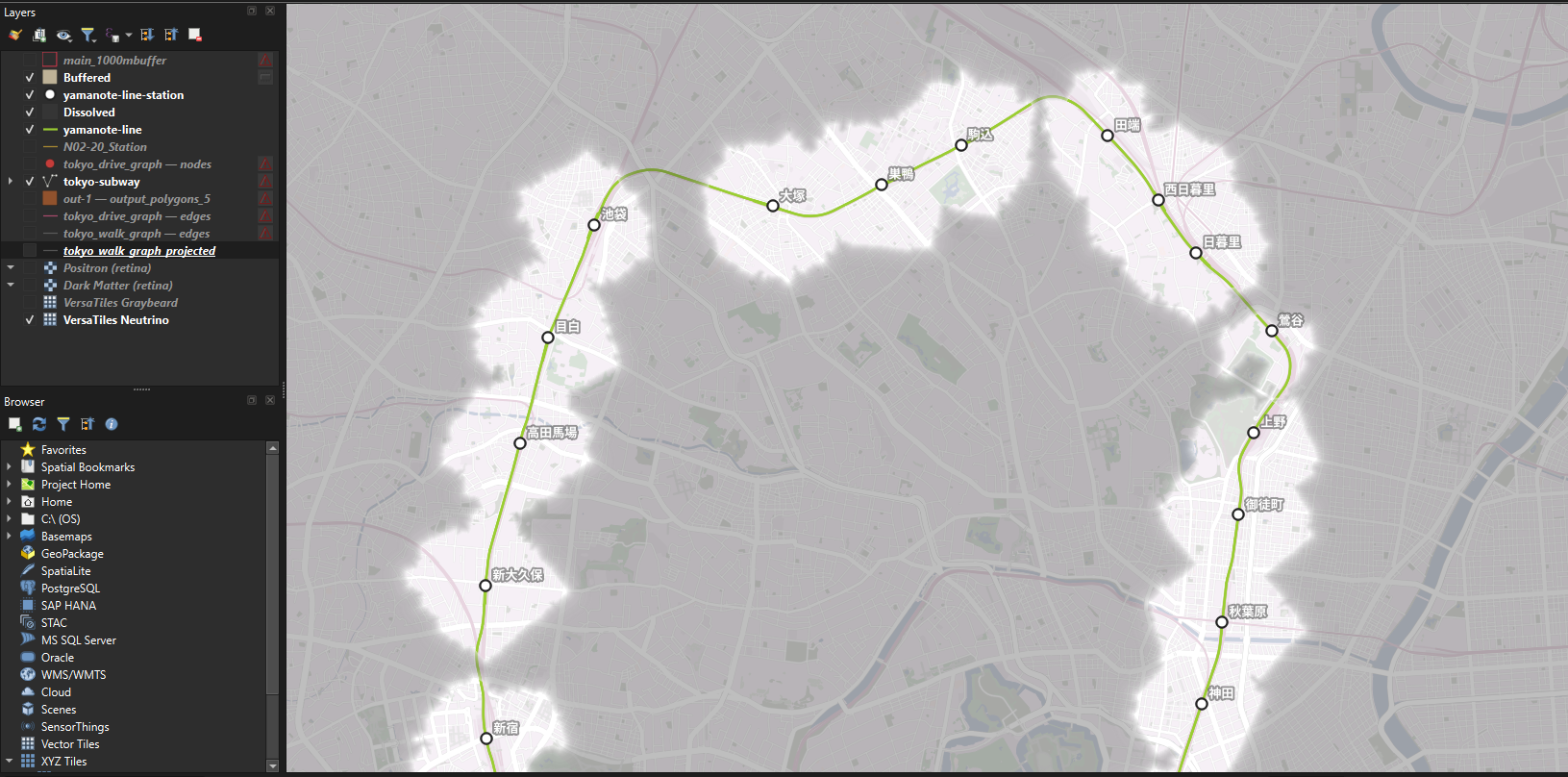
Day 7 - Accessibility + Day 13 - 10 minute map
I twisted the idea of “10 minute” again, as I have in previous challenges. Do urban planners always associate short distances and travel times with accessibility, or is that just me?
Confession: writing this postmortem, I can’t quite remember how the idea started. Looking at the working file, I seem to have been playing with Japanese railway data when I had the revelation: “check the reachable area of stations, it must be fun”. It was a fun way to explore Tokyo’s walkability.
Looking back at the map, an urban nerd (aka me) can pick out a few things:
- The 10-minute walking areas on the eastern side of the Yamanote Line are closer together and overlap more often.
- The gap between Ikebukuro and Otsuka is much larger than between any other pair of neighbouring stations.
- Uguisudani’s isochrone, or reachable area, is much smaller than those of other stations, likely because I used the station centroid as the starting point rather than the exits. The station’s layout is too niche a subject to explain here.
Ask yourself a question and map it out. It’s one of the easiest ways to understand the geography of a place. Trust me.
Tools used: QGIS
#30DayMapChallenge Day 13 - 10 minute map
— Kenneth Wong (@Kenneth_KHW) November 13, 2025
Reachable areas within a 10-minute walk / 10-min isochrones of Yamanote Line (山手線) stations
And yes, the map took much longer than 10 mins to make, sorry not sorry pic.twitter.com/Kq8jCW8gOV
https://x.com/Kenneth_KHW/status/1988992343010341184
Day 14 - OpenStreetMap
Late entry.
For me, the OpenStreetMap theme raises a question: what makes crowdsourced data different from other datasets? In 2022, I used version numbers to look at edits to road segments by OSM contributors.
Then I remembered something I often notice when reading OSM basemaps: they show far more peaks than Hong Kong’s government basemap. Hikers identify hilltops they believe deserve a place on the map. The Lands Department’s Survey and Mapping Office, meanwhile, focuses on trigonometric stations used for land surveying.
So the question became: how do the peaks identified in OSM compare with the government’s trigonometric stations? I extracted the OSM peaks through the Overpass API and the government stations from the iB5000 basemap.
Cartographically, I’m not satisfied with this entry. The information feels crammed together. I don’t think every entry needs to tell a story; a visually appealing map is enough. But this one struggles to communicate even the basic information. I think readers would find it hard to locate the peaks.
And I’ve just realised I forgot the scale bar…
#30DayMapChallenge Day 14 - OpenStreetMap
— Kenneth Wong (@Kenneth_KHW) December 3, 2025
Comparing peaks in Hong Kong based on crowdsourced OSM data vs. official government data
We don’t have a strict definition of when the top of a hill should be considered a peak anyway ¯\_(ツ)_/¯ pic.twitter.com/r9BkCgLbCQ
https://x.com/Kenneth_KHW/status/1996237228255965318
Day 17 - A new tool
I follow Kyle Walker on Twitter and see examples of his {mapgl} package from time to time.
I rarely make 3D maps, and interactive maps even less often. I opened Positron, copied the sample code from the {mapgl} documentation, and adjusted the variables until it worked. I had never worked with camera animation before. It took a few more hours to adjust the camera distance and angle until the zoom from wider Tokyo to Shibuya felt smooth.
I wouldn’t call this a good map, but it was the entry that most lived up to the word “challenge”.
Tools used: R
#30DayMapChallenge Day 17 - A new tool
— Kenneth Wong (@Kenneth_KHW) November 18, 2025
Testing out the {mapgl} in #RStats (kudos to @kyle_e_walker for creating the package) with a zoom-in animation to Shibuya
Blue zones are 10-minute walking isochrones from each Yamanote Line station made for the previous map pic.twitter.com/k2jixoAI8G
https://x.com/Kenneth_KHW/status/1990802489650917535
Day 19 - Projections
Neither a traditional thematic map nor an analytical one. This entry deserves a few more paragraphs.
The Projections theme immediately reminded me of Kate Berg’s 2023 map, “It Ain’t Easy Being Greenland”. My understanding of projections is limited, and trying them out in GIS is how I learn. When I first saw that map, I wanted to make my own version.
Simply replicating it would have been boring. Similar ideas are bound to occur to different people (we’re all map nerds, after all), but I wanted to present mine differently. After switching between projections in QGIS, I decided to stack all the “projected Japans” and see how much they overlapped.
I made the 19 shapes one by one in QGIS, each with a faint fill and Tokyo marked. Then I imported them into Figma, aligned them manually, and stacked them. The result is this “do-not-ask-what-does-it-mean” map. I wanted to learn how Japan’s map projections are defined; the map was a by-product.
Tools used: QGIS + Figma
#30DayMapChallenge Day 19 - Projections
— Kenneth Wong (@Kenneth_KHW) November 19, 2025
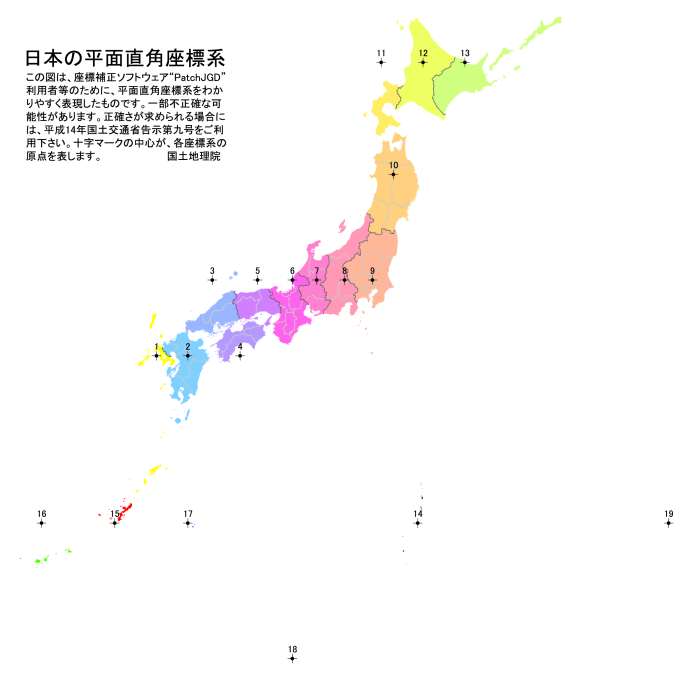
19 projected coordinate systems of Japan (JGD2011 Japan plane rectangular CS, I to XIX) shown together, with Tokyo being the centre point
Don’t ask me what does this map means, I also have no idea what I’m doing pic.twitter.com/XFtI6LXKYd
https://x.com/Kenneth_KHW/status/1991113643665371217
Note: After making the map, I found this projected coordinate systems cheatsheet from the Geospatial Information Authority of Japan. I had only looked at the bounding box of each system’s area of use. Seeing the origins of all 19 systems on one map made their numbering much easier to grasp. I admit I had no idea where systems 14 to 19 were meant to be used before seeing it.
Day 29 - Raster
Late entry. I made this after returning from Sydney and Melbourne last November.
I love Australia. Besides reading Wikipedia and aimlessly browsing Google Maps and Street View, one way I explore a country’s geography is to find something that varies across it and map it.
The idea came from reviewing my 2024 entries. I thought I could build on the Japanese rainfall and nighttime temperature anomaly maps by exploring other meteorological data. So I opened the JAXA catalogue through the same QGIS plugin (hats off to MIERUNE again) and found land surface temperature data.
The rest was calculating the daytime/nighttime difference with the raster calculator and adding city and state/territory labels using Natural Earth data. I believe this was my first time mapping Australia. I spent at least an hour working out how to show the state abbreviations, and learnt that places like Jervis Bay Territory exist.
Looking back, the blue is too harsh. The state abbreviations are too small, and their light grey colour works poorly against the blue raster.
#30DayMapChallenge Day 29 - Raster
— Kenneth Wong (@Kenneth_KHW) December 27, 2025
Daytime/Nighttime temperature difference in Australia, Jan 2025
Wanted to map something about the country after my trip last month, and land surface temperature is always a good starting point for exploring a place you don't know much about pic.twitter.com/oLJNhWEfqo
https://x.com/Kenneth_KHW/status/2004922404876018084
Bits and Bobs
More of a Q&A with myself about the entries.
Why do you want to join the challenge?
I revisited my 2024 postmortem and found this paragraph:
It’s fun to make and share maps, and I feel great when posting the maps because it feels fun to post your works online and see others’ submissions, which in turn provides more ideas for myself on how to make great maps. The rewards are not monetary, and I hope to keep the map-making process as pure as possible.
It’s still the same for 2025. I want to see great maps. I want to make great maps. It’s a hobby, but keeping a finished map to myself feels like a waste. Sharing it gives me a way to “justify” the time spent making it.
#30DayMapChallenge has become a place for me to “publish” my maps. An event makes it easier to reach people and start a conversation: “I made some maps. You made some maps. Let’s discuss the maps.”
Whether it’s an excuse or a reason, the challenge gets me to open QGIS, R, and Figma and make maps.
What do you want to achieve?
From my 2024 postmortem:
I never have a clear goal when joining the challenge, deciding the themes, and posting the maps on social media. Joining the #30DayMapChallenge has become my yearly routine and the easiest way for me to enter the “map-making” community online.
For me, the challenge is about making good maps or at least copying the masterpieces from guru cartographers across the internet and creating my own versions.
It’s about learning and seeing great maps. I don’t make maps for a living, and keeping it as a hobby helps it stay fun. Likes and new followers are nice. But I don’t want the numbers to gradually shift my attention from improving my maps to maximising my reach on Twitter. I’m not trying to become an influencer.
What I want is simple: to craft great maps.
Map making is fun. Let it stay as fun as possible.
- Posted on:
- October 31, 2026
- Length:
- 13 minute read, 2704 words
- Categories:
- Behind the Scene Cartography
- See Also: